Color Palette Creation is a Breeze with ColorPic
ColorPic allows you to grab colors from your screen and create color palettes simply and quickly.
$15 off$29.50$14.50

Check out everything on offer...

Discover the many uses of ColorPic


Web Designers
Create palettes for HTML layouts in Chrome, Safari, Firefox or Edge


Graphic Designers
Use with Adobe Photoshop, Canva or Illustrator to get the full spectrum of colors


Engineers
Works with CAD, measure blueprints, plans and architectural drawings
Our easy to use Windows app floats above other software, allowing you to grab any color.
Sitepoint.com writes
"Few have pulled all the right functionality together as usefully and elegantly as Nico Westerdale's ColorPic."
Clubic.com writes
"Tout web designer qui se respecte se doit de l'avoir sous la main." in its French review of ColorPic.
Photoshop-Weblog.de writes
"Ein geniales kleines Programm!" in its German review of ColorPic.

Powerful and Simple to use
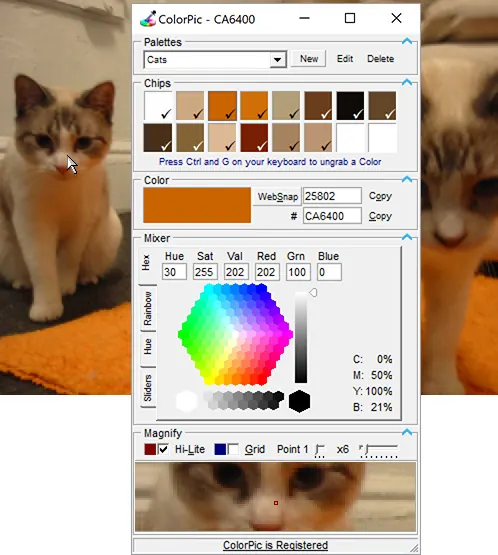
Ever tried using a color picker tool on a high resolution monitor? It's impossible. That's why this color picker has a magnifier attached. Grab palettes of up to 16 colors at once and use four advanced color mixers to select a spectrum of possibilities.
ColorPic can be used with any program as it floats over other applications allowing quick and easy color snagging. Read the full specs on how everything works.

Unlock the full version
Find out all the professional features , including full color palettes and transparency settings that are available after purchasing.

Tweak any Color
Need to adjust a color? ColorPic makes it easy with a multitude of visualizations that go beyond RGB and Hue Saturation and Brightness.

Save Color Chips
Save your color chips in multiple palettes allowing you to create custom color schemes for any design task.