Deploying Screen Calipers in the Enterprise

Chief Executive Officer
IT checklist for Iconico measurement tools
Manufacturing, engineering, and hospital IT teams ask the same questions before rolling out Screen Calipers: permissions, licensing, and what happens when a PC is replaced. This guide collects answers from twenty years of enterprise support, without naming any one customer site.
In a large-scale deployment, stability is as important as functionality. Iconico tools are built to be lightweight, with no external dependencies or cloud connectivity requirements. This makes them ideal for secured environments, such as hospital workstations or engineering labs, where data exfiltration is a concern and "always-online" software is a liability.
Install, Permissions, and Group Policy
One of the most frequent questions from IT admins is about the installation footprint.
- Standard User Rights: The trial and full installer are per-user Windows applications. Most teams deploy with standard user rights; no administrative server component or database is required.
- Silent Deployment: If your team uses SCCM, Intune, or PDQ Deploy, you can allowlist the Iconico installer or deploy it through your standard software catalog after an internal test on Windows 10 or 11.
- Zero-Install Evaluation: Calipers, Protractor, and Compass can run directly from the Screen Measurement Pack zip file. This allows your security team to audit the binaries without ever running an installer.
Volume Licensing and Lifecycle Management
Each paid license is tied to one active workstation at a time, with a portable-machine exception for the primary user per our license agreement .
When engineering replaces a laptop, simply uninstall on the old machine and register on the new one with the same key. If a drive fails before an uninstall can occur, your IT team can contact our support with the purchase email; we handle legitimate transfer requests routinely to ensure your staff remains productive.
Bulk Discounts: Volume and site licenses are available for departments of 10 or more users. Email us through Contact Us with your seat count. We work with procurement departments to accept purchase orders and check payments.
Automation and Embedding
For advanced use cases, your internal dev team can control our tools programmatically.
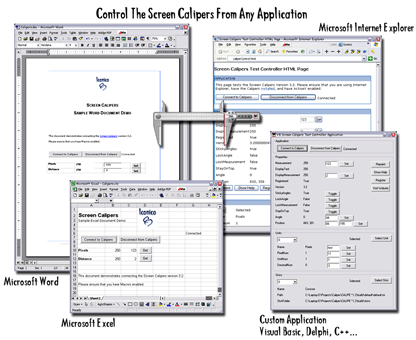
If your internal tool should launch Calipers and read the measurement back, use the free Screen Measurement SDK (COM). This is frequently used in QA labs and research facilities to ensure data integrity during the measurement process.
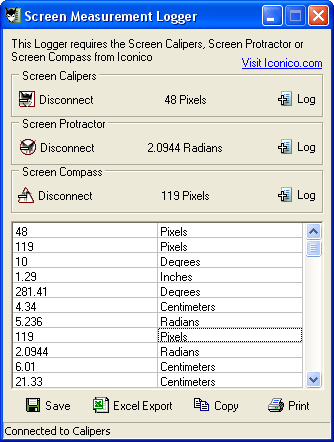
For teams that need simple logging without custom code, the free Measurement Logger app provides a ready-made way to export measurements to CSV.
Try Screen Measurement Pack
Download the free trial for Windows 10 and 11, or buy a license.
