5 On-Screen Tools for Interactive STEM and Geometry Lessons

Chief Executive Officer
Making Math visible
Teaching geometry, physics, or cartography in a digital classroom presents a unique challenge: how do you demonstrate "real-world" measurement on a flat, two-dimensional screen? While interactive whiteboards and screen-sharing tools are a good start, they often lack the tactile precision that students need to internalize mathematical concepts.
When a student can manipulate a tool—aligning a vertex, setting a baseline, and reading a scale—the abstract logic of an equation becomes a tangible, visual reality. For educators, the goal is to bridge the gap between theoretical math and practical application.
Here are 5 essential on-screen tools for STEM educators to bring measurement to life in 2026.
1. Screen Protractor (Iconico)
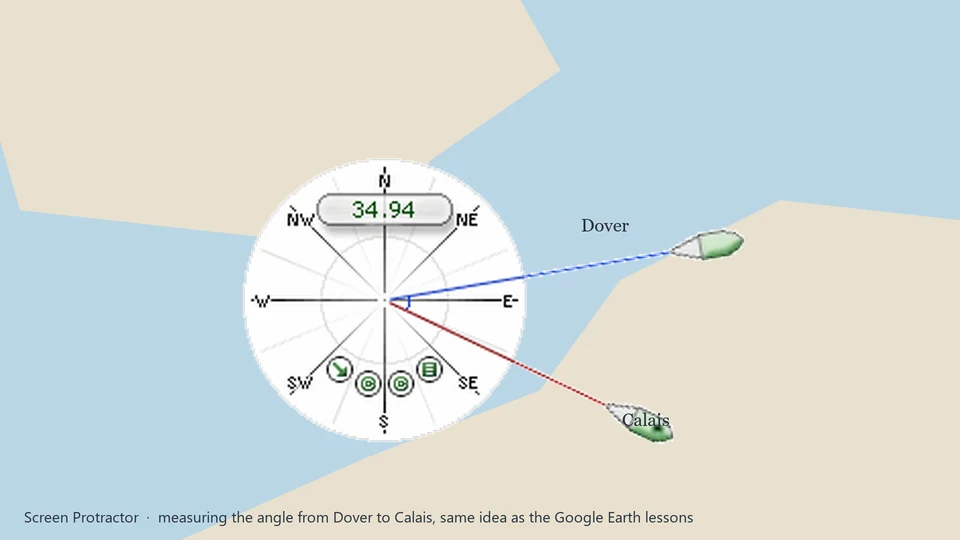
Our favorite, naturally. Screen Protractor allows students to measure angles on any digital image—from Google Earth maps to biology slides. It's especially powerful because it floats over any application, meaning you can use it alongside your existing curriculum software or web-based textbooks.
Classroom Tip: Have students use the protractor to measure the bond angles in 3D molecular models or the slope of a mountain in a geography lesson. The transparent interface allows them to see the data and the tool simultaneously.
2. GeoGebra
An industry standard for dynamic mathematics. GeoGebra allows students to construct points, vectors, segments, and lines, providing a deep playground for geometric discovery.
3. PhET Interactive Simulations
Developed by the University of Colorado Boulder, PhET provides free interactive math and science simulations. Students can experiment with pendulums, circuit construction, and area models in a sandbox environment.
4. Screen Calipers (Iconico)
When lessons move to pixel precision, map scaling, or technical drawing, Screen Calipers are the perfect companion. Students can calibrate the calipers to a map's scale bar (e.g., set 100 miles = 200 pixels) and then measure real-world distances between cities directly on their screen.
Classroom Tip: Use Screen Calipers to teach the concept of "ratio and proportion" by having students measure elements in a photograph and compare them to known real-world dimensions.
5. Desmos Graphing Calculator
The modern standard for graphing. Desmos is fast, intuitive, and allows students to visualize functions and data sets with immediate feedback.
Check out our free lesson plans for teachers on the Screen Protractor Lesson Plans page.
Try Screen Protractor
Download the free trial for Windows 10 and 11, or buy a license.
