PowerToys Screen Ruler vs Screen Calipers

Chief Executive Officer
Two different tools for two different jobs
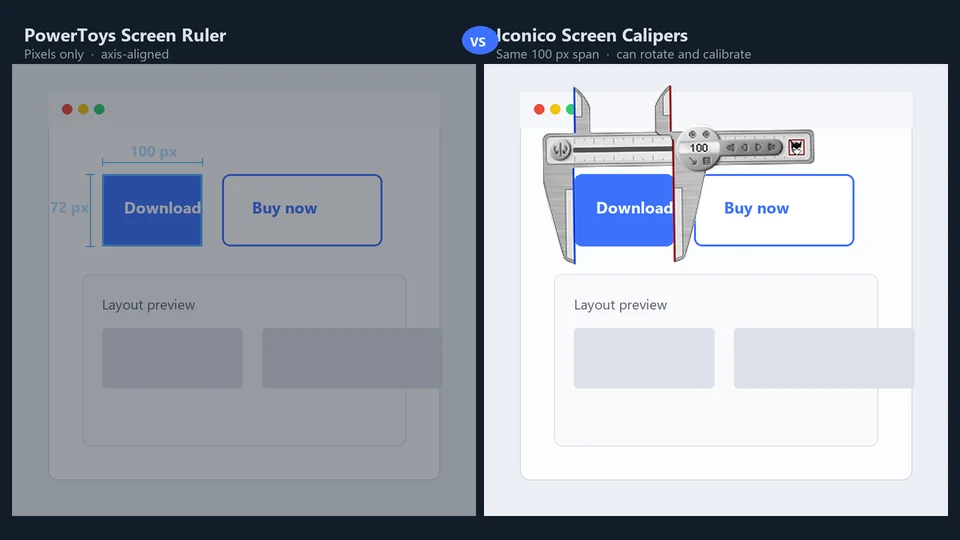
Microsoft PowerToys includes a free Screen Ruler. It is handy. If you need a quick pixel count while tweaking a layout in Figma or checking padding in a browser, PowerToys is often enough.
Iconico Screen Calipers are built for a different kind of work: floating measurement over any Windows app, at any angle, with calibration to real units. We have sold them to sign makers, engravers, CAD users, and hospital staff for twenty years. PowerToys does not replace that workflow. It complements it.
What PowerToys Screen Ruler does well
- Free, built into PowerToys, no separate install beyond the suite
- Fast horizontal and vertical pixel distances
- Good for UI developers checking spacing in design tools
- Lightweight; you invoke it, measure, and move on
If your only question is "how many pixels wide is this button," PowerToys is a sensible answer. We use similar tools ourselves when a single axis count is all we need.
Where Screen Calipers fit better
Screen Calipers behave like physical calipers on your monitor. You drag the jaws, rotate the tool 360°, lock an angle, and read a distance that can mean pixels, inches, millimeters, or whatever you calibrated.
- Angled measurements. A blueprint line, a map contour, or a vinyl cut path is rarely perfectly horizontal. Calipers rotate; a screen ruler line often is not enough.
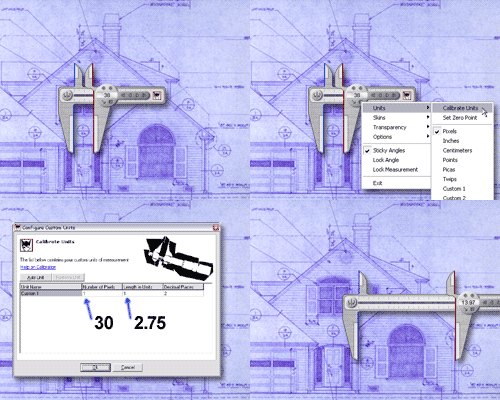
- Calibration. Measure a known distance on a PDF or scan, enter the real length, and every reading after that is in feet, millimeters, or custom units. PowerToys reports pixels only.
- Persistent overlay. Calipers stay on top while you work in another program. Hide them to the edge, recall them, micro-adjust one pixel at a time.
- Paired tools. The same pack includes Screen Protractor for angles and Screen Compass for circles and areas. PowerToys Ruler is a ruler only.
A quick decision guide
Choose PowerToys Screen Ruler when you want a free pixel ruler for occasional UI checks and you already run PowerToys.
Choose Screen Calipers when you measure over CAD, PDFs, maps, medical images, or layout software that lacks rulers; when you need real-world units; when the line is not axis-aligned; or when you log dozens of measurements per day (see our free Measurement Logger ).
We are not trying to talk you out of PowerToys. We are trying to save you frustration if you already hit its limits. That is usually when someone searches for a PowerToys screen ruler alternative and lands here.
Try Screen Calipers
Download the free trial for Windows 10 and 11, or buy a license.
