Screen Calipers for Music Engraving Spacing

Chief Executive Officer
Iconico Files: spacing notation that DTP rulers cannot see
Music engraving is typesetting for scores. Notes, beams, stems, and symbols obey rules that word processors never touch. Even strong notation software leaves judgment calls: how far a dynamic sits from the staff, whether pedal marks align across systems, whether measures breathe evenly across a page spread.
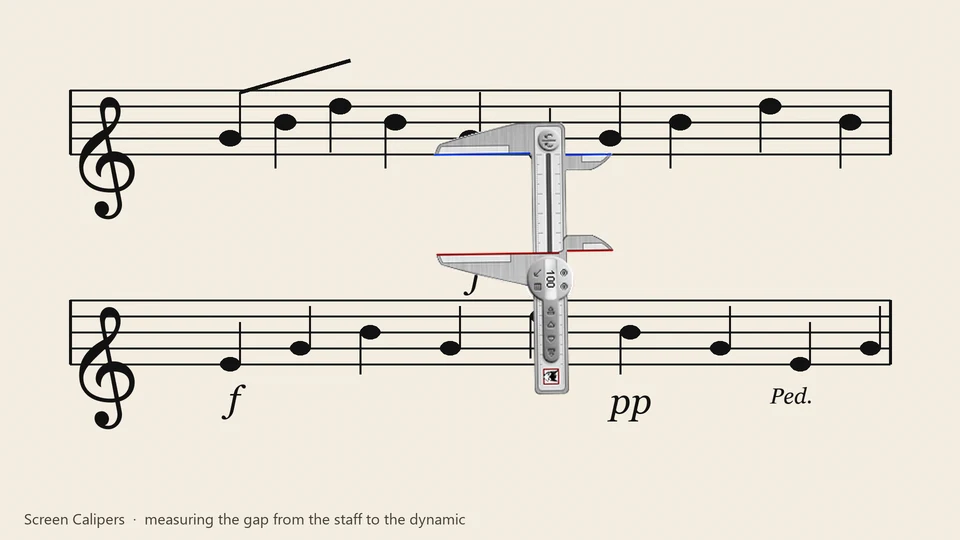
In professional engraving, the "default" spacing of Sibelius or Dorico is often just the starting point. When a composer needs a specific visual density or when a publisher requires a precise house style, you need a way to measure the gaps between glyphs that doesn't involve exporting to a PDF and opening it in Illustrator.
"Music engraving is the typesetting of music, very much like DTP, but words are far more straightforward than musical notation, which is frankly somewhat of a pain to do on computer. The Calipers help me to standardize the spacing of certain musical notations such as dynamics, articulations, and pedal markings, as well as assist in the even spacing of measures of music across staff systems."
David Pressler, Screen Calipers customer
David's note captures why a generic pixel ruler fails here. You are not measuring a box model. You are comparing gaps between glyphs on a curved staff grid, often at odd angles, often while zoomed in on one system and zoomed out on the full page.
What David measures with Screen Calipers
The versatility of the rotating jaws allows for a variety of precise checks:
- Dynamics and hairpins: Check that f and pp sit the same distance below parallel staves, ensuring a clean vertical alignment.
- Articulations: Compare staccato dots and accent wedges so a phrase looks consistent, not accidentally tight on one measure.
- Pedal markings: Align ped. and release lines across systems when the engraver's defaults drift due to collisions.
- Measure width: Spread bars evenly when manual layout overrides the compiler's spacing, maintaining a consistent rhythmic feel across the page.
Screen Calipers rotate. That matters when a slur or beam is not horizontal. You drag the jaws along the visual gap you care about, read the distance, adjust the notation, measure again. The overlay stays on top of whatever engraver you use.
A practical workflow
- Finish a draft system or page in your notation program.
- Open Screen Calipers over the score window.
- Pick a reference gap (for example, the space between a dynamic and the staff on the first system).
- Measure the same element on other systems. Match by eye with a numeric readout instead of guessing.
- For measure spacing, span the width of a bar you like, note the value, then compare other bars on the line.
If you log many measurements while proofing a part, pair Calipers with the free Measurement Logger to export a grid to CSV or Excel.
Not a replacement for the engraver
Screen Calipers do not set spacing rules inside your notation software. They give you a trusted ruler on screen when the built-in grids and inspectors are not enough. David uses them as a constant check, the same way a print designer keeps a physical ruler on the desk.
Try Screen Calipers
Download the free trial for Windows 10 and 11, or buy a license.
